Managing Signing Hash
Signing Hash Management
One should remember that the hash keys for signing in the project use for three different purposes:
1. Quality Assurance
One uses the keystore for the local release deployed via Firebase App Distribution or the command:
1
$ flutter build apk --release
The information on the keystore is saved in android/key.properties. Then build.gradle.kts reads this hash key. The file key.properties contains the key that is used to sign the app. More specifically, it is a configuration file for the app development to securely save the sensitive signing information, such as the key storage directory and password.
key.properties cannot be accessed from the app memory. This is because it is designed to be included in an APK or AAB package. Even if the app is extracted, the attacker cannot see this file. However, one should not use the values in this file as variables in other codes. In addition, this file should not be uploaded to the Git repository.
The app can only request operations: sign() and decrypt() even if the app receives the private key. Thus, the app loads the results from the Android system security component.
2. For debugging
The debug keystore is the default signing key for the development. If one builds the app by flutter run or the debug mode, the compiler reads the key from the file .android/debug.keystore.
3. For releasing
One needs to use the “Play App Signing Certificate Hash” for the APK to deploy to Google Play Store.
How to generate the hash keys for each purpose?
Firebase fingerprint
Here, the fingerprint refers to “registration information” between the Firebase and the app package. This states that “Firebase trusts the app signed with this certificate under this package name.” Since the package name (com.example.app) used to identify the app can be mimicked, Firebase inspects the fingerprint (SHA-1, SHA-256) of the certificate that signed the app. The fingerprint is required when using the following features:
- Login via Google
- Phone number verification flow
- App Check and Play integrity
- Creating an Android OAuth client that connects to Google APIs
If one generates the keys for the Firebase fingerprint, the hex SHA-256 is enough for its use. There are two keys required for the fingerprint: the debug mode and the release one. These are obtained by entering the following command in the android/ folder:
1
2
3
$ echo 'export JAVA_HOME=/A.pplications/Android\ Studio.app/Contents/jbr/Contents/Home' >> ~/.zshrc
$ source ~/.zshrc
$ ./gradlew signingReport
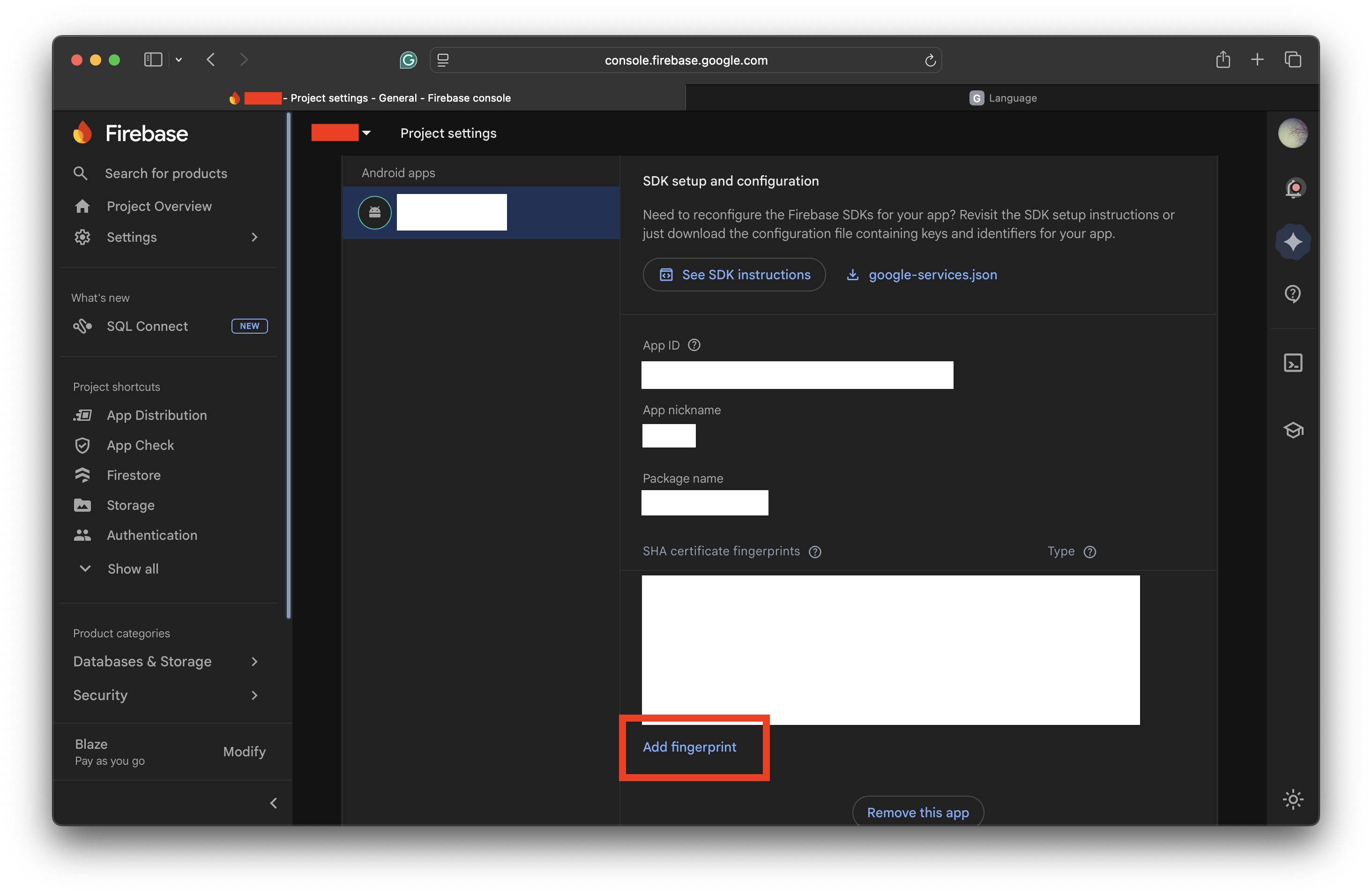
Then each hash key is printed in :app:signingReport as the output. One can choose either Variant: release or Variant: debug depending on his or her purpose. After extracting the hash key suitable for each purpose, one can add the fingerprint to the Firebase site (Project Settings > General > Your apps > Add fingerprint):
freeRASP
RASP is the abbreviation of “Runtime Application Self-Protection.” It is a security tech that detects and blocks the threat in the application. There is an open source package freeRASP for Flutter projects. Since the freeRASP expects the Base 64 SHA-256, one must use keytool or transform the hex SHA-256 obtained from signingReport to Base 64 one. Here, it is shown how to transform the key into the Base 64 one:
1
$ echo "AA:BB:CC:DD:..." | tr -d ':' | xxd -r -p | openssl base64
If one does not add a hash key when freeRASP is enabled, the error Unhandled Exception: Bad state: freeRASP initialization skipped: missing RASP_WATCHER_MAIL, RASP_RELEASE_CERT_HASHES occurs. Therefore, one must include the SHA-256 hash key of the local keystore in the build step:
1
2
3
flutter run --release \\
  --dart-define=RASP_WATCHER_MAIL=email@example.com \\
  --dart-define=RASP_RELEASE_CERT_HASHES="HASH_KEY"
Issue. freeRASP 7.5.1 is a library built and tested on AGP (Android Gradle Plugin) 8.8.1. However, with the update to AGP 9.x, it is reported that global option validation for consumer ProGuard files has become more stricter. Since freeRASP is responsible for controlling runtime security and flattening the APK build output structure is out of scope of its responsibility, this update can be considered to have been applied correctly.
Q. What is
consumer-rules.pro?
If the library imports consumer-rules.pro, the rules of .pro automatically emerge for the build that uses the library. An option -flattenpackagehierarchy updates not only the library itself, but the output structure of the app. The Android Gradle Plugin (AGP) prohibits the use of these global options to prevent the degradation of the app quality (security issues and side effects) and the user experience (See the link).